


Yahoo News: Daily News For You
4.544.41K Reviews
App Specs
- Version
- 93.0
- Updated On
- License
- Free
- Downloads
- 10,000,000+
- Developer
- Yahoo
- Categories
- News & Magazines
- Platform
- Android, iOS
Screenshots





 Analysis by AppCompare
If you're like me and always on the hunt for the latest headlines and a deeper understanding of what's happening around the globe, then Yahoo News: Daily News For You might just be your new go-to app. I recently gave it a whirl on my phone, and I have to say, it’s packed with features that cater to news enthusiasts like us. Its appeal is less about replacing every other way you follow current events and more about giving you one place to check a broad mix of coverage, then spend longer on the stories that matter to you.
A quick check-in rather than a research desk
I find this kind of news app most useful in short visits: a glance while waiting for coffee, a scan during a commute, or a few minutes at lunch to see what has changed. Yahoo News is a free news and magazines app from Yahoo, and its basic appeal is easy to understand: it brings headlines and deeper coverage together, with a feed that can be shaped around your interests. The practical question is whether that suits your reading habits. If you want a convenient daily overview, it can. If you need a single publication’s tightly defined editorial voice or specialist reporting on one subject, a dedicated news source may be a better fit.
The app has an average rating of 4.4 from around 245,000 ratings, alongside roughly 44,000 written reviews and over 10 million installs. Those figures suggest that it has found a substantial audience, but popularity alone does not tell me whether its feed will suit you. I would judge that by how quickly you can find useful stories, whether the mix remains relevant after you personalize it, and how much time you want to spend reading beyond the headlines. It is rated for Everyone 10+, which is worth bearing in mind when deciding whether it is appropriate for younger readers in your household.
Breaking Down the Features
First things first, let’s talk about the interface. When you open Yahoo News, you’re greeted with a clean and straightforward layout. This app isn’t about bells and whistles; it’s about delivering news efficiently. The top stories are right there, front and center, and you can scroll down to delve into different categories like politics, sports, entertainment, and more. That arrangement works well when I have only a minute: I can scan the main stories, then decide whether one deserves a closer read instead of searching through a long list of sections first.
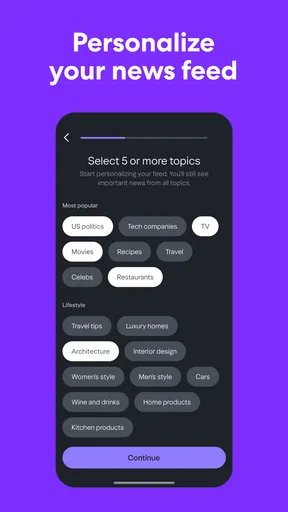
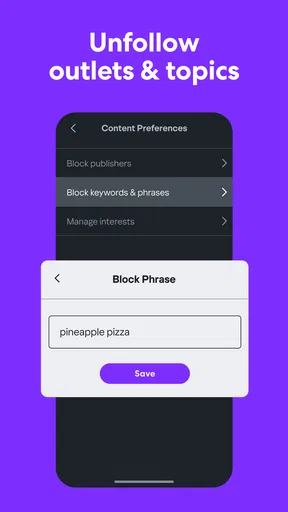
One feature I found particularly handy is the customization option. You can tailor your newsfeed according to your interests. Want more sports updates or less celebrity gossip? No problem! You can tweak your settings to prioritize what matters most to you. This personalization really makes it feel like the news is curated just for you. My practical tip is to treat those preferences as a starting point, not a filter that should decide everything you read. If I narrow a feed too aggressively, I risk missing a major story simply because it falls outside my usual subjects; keeping some room for general coverage makes the daily scan more balanced.
Stay Updated with Notifications
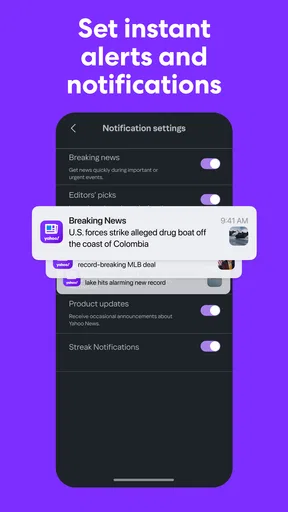
Let’s be honest, in our fast-paced world, staying updated is crucial. Yahoo News offers push notifications for breaking news. Now, I know what you’re thinking—"not another app to clutter my notification bar!" But trust me, these alerts are timely and relevant, ensuring you don’t miss out on significant events. You can also adjust the frequency and types of notifications you receive, which is a nice touch. I would start selectively rather than turning on every alert: a breaking-news prompt is useful when I am away from my usual reading routine, but frequent interruptions can make an app feel more demanding than helpful. If an alert catches my attention, I use it as a pointer to read the story, not as a substitute for understanding the full context.
Exploring the Multimedia Content
Another standout feature is the multimedia content. It’s not just about articles here; Yahoo News integrates videos and photo stories seamlessly. Watching a quick clip or flipping through a photo gallery provides a richer context than plain text sometimes can. This multimedia approach makes consuming news more engaging and digestible. It also changes what I expect from a quick session: a video can help explain what an event looks like, while written reporting is usually easier to skim when I need names, background, or a detail I might want to revisit. When I am trying to conserve attention or reading in a quiet place, I prefer to stay with text rather than assume every story is best watched.
Worth Reading Before You Choose

Baby Panda World Brings Quick Play to Modern Phones, but Its Game Library Feels Busy

ESPN’s Live Game View Makes Following Close Games Easier

QuizzLand Review: A Good Fit for Short Trivia Breaks, Not Every Player

Basketball Stars: Multiplayer Is Fast, but Can It Recover When Matches Go Wrong?

WEBTOON Turns Phone Updates Into a Better Reading Routine

Link to Windows Runs on Shared Habits, Not Social Feeds
A realistic routine might be to open the feed before leaving home, scan a few leading headlines, and save a longer article for a train ride or a break later in the day. That is where the combination of quick browsing and saved reading makes more sense than trying to consume every alert as it arrives. I would also use the categories deliberately: checking a subject I care about can be satisfying, but returning to the broader front page now and then helps me notice important coverage beyond my regular interests. This is a small habit, but it keeps personalization from becoming a bubble of familiar topics.
Offline Reading: A Life Saver
Now, if you’re someone who spends a lot of time on the go, like I do, you’ll appreciate the offline reading feature. You can save articles to read later when you’re offline. Whether you’re on a flight or in an area with spotty internet, your saved articles are just a tap away. It’s a lifesaver for those moments when you need to kill time but don’t have a connection. I find it most useful as a planned handoff: save a story while connected, then open it when reception drops, rather than waiting until the connection is already gone. For a commute, that means I can choose what to read beforehand instead of relying on a live feed at the point when I want to settle in.
That workflow also helps answer a common practical question: can I count on the app when I am offline? Saved articles make reading possible without a live connection, but I would not treat offline access as a replacement for browsing current coverage. I would prepare a small reading queue before a trip and expect to return online for fresh headlines and updates. Likewise, if I only have a moment and no connection, a previously saved story is more dependable than expecting a new video or page to load. This is a useful distinction for anyone who travels, rides through patchy coverage, or wants to manage reading around connectivity rather than constantly checking for a signal.
Community Interaction and Comments
Yahoo News also incorporates a community aspect. You can comment on articles and join discussions. It’s always interesting to see different perspectives and engage in conversations with fellow readers. However, like most comment sections, it can be a mixed bag, so take it all with a grain of salt. I treat comments as a way to see how other readers are reacting, not as verification of the story or a substitute for reporting. If I want to understand a claim, I go back to the article itself and consider its evidence and context. That boundary makes discussion more useful while lowering the chance that a lively thread distracts me from what is actually known.
How it fits beside other news apps
Compared with following a single newspaper or broadcaster, Yahoo News is more convenient for browsing a variety of subjects in one place, especially when I am not yet sure what I want to read. The trade-off is that a broad feed may not feel as focused as a publication built around one newsroom’s particular approach. Compared with reading headlines through a web browser, the app gives me a more direct, personalized routine and the option to save articles for later. A browser remains the simpler choice if I only want to open an occasional story without adding another app to my habits. For deep research, specialist outlets and primary sources still matter; I would use Yahoo News to discover and follow stories, then seek more focused coverage when a decision or a complicated issue requires it.
That makes it a good match for curious readers who like a varied overview, enjoy adjusting their mix of topics, or want a manageable reading queue for time away from a connection. It is less compelling for someone who wants only one source, dislikes personalized feeds, or needs a highly specialized news tool. A broad selection can save browsing time, but it can also leave me choosing between stories instead of developing a deeper understanding of one subject. I would not expect one feed to replace the reading habits that matter most to me; I would use it as a convenient layer in them.
Speed, stability, and everyday device limits
For a news app, speed is not just how quickly the first screen appears; it is also how quickly I can move from a headline to the story I actually want. The straightforward layout and visible top stories support that kind of quick scan. Still, media-heavy pages and video are naturally a different sort of session from skimming text, and the experience can depend on the connection and the phone in use. I would not assume every item will feel equally immediate in every situation. When I need the least friction, I start with headlines and text, and leave video for a moment when I have time and a reliable connection.
Heavy use changes the rhythm. A brief morning check may be light, but repeatedly refreshing coverage, opening several stories, and watching clips can make a session longer and more demanding than a quick glance. I avoid leaving a stream of notifications enabled unless I genuinely want them; choosing only the alerts I value makes the app easier to live with, while checking the feed at chosen times keeps news from taking over every pause in the day. These are habits rather than performance tricks, but they help make a broad, frequently visited news source feel manageable.
On reliability, I value having a reading option that does not depend entirely on staying online, and saved articles provide that fallback for material I chose in advance. If a page is slow or a connection drops, I would switch to an already saved story rather than repeatedly retrying the same live content. That is a more useful recovery plan than expecting offline reading to keep the entire news feed current. The app’s version is 93.0, and it requires Android 7.0 or later; those details help with basic compatibility, though how responsive it feels still depends on the individual device and network.
Resource demands are difficult to judge in the abstract because reading plain text, loading images, and playing video are not identical tasks. If I am concerned about battery, data use, or a phone that feels strained, I would favor shorter text sessions and avoid treating video as the default way to catch up. I would also consider whether I need a large, personalized news feed at all: someone who checks only one source may find a direct publication app or a browser less cluttered in daily use. Yahoo News costs nothing to download, but the real trade-off is attention—the time spent sorting through a broad mix of stories and deciding what deserves a deeper read.
Yahoo News first appeared on October 5, 2010, and its current version shows that it is an established product rather than a new experiment. That history may reassure readers who want a familiar news destination, but it does not guarantee that every update or article will suit every person. I would approach it as a practical starting point: adjust the subjects and alerts, keep a little general coverage in the mix, and use saved stories to plan around periods without service. If the feed remains relevant after that, it can become a useful daily habit; if it keeps surfacing material I do not want, I would be better served by a narrower source.
Overall, Yahoo News: Daily News For You is a solid option for anyone looking to keep up with current events in a personalized and engaging manner. With its customizable feed, multimedia content, and offline capabilities, it’s tailored to fit the lifestyle of the modern news consumer. So, if you haven’t checked it out yet, give it a try and see how it fits into your daily routine. My performance verdict is measured rather than absolute: it is best when I use it for a quick, organized overview, choose notifications carefully, and save reading for later when I know I may be offline. If you want one adaptable place to browse, I think it is worth trying; if you want a single, tightly focused editorial source or a distraction-free way to read, another option may suit you better.
Pros
- Customizable news feed tailored to interests.
- User-friendly interface with smooth navigation.
- Wide range of news sources for diverse perspectives.
- Push notifications for breaking news updates.
- Offline reading mode saves data usage.
Cons
- Occasional ads can disrupt the reading experience.
- Some articles require internet connection.
- Limited personalization for notification settings.
- Video content can consume significant data.
- App crashes reported on older devices.
FAQs for Yahoo News: Daily News For You
What features does Yahoo News: Daily News For You offer?
Yahoo News: Daily News For You provides a personalized news experience by curating articles based on your interests. It offers a wide range of topics, including politics, sports, entertainment, and technology. Users can access live video coverage, local news, and breaking news alerts to keep them informed in real time.
Is Yahoo News: Daily News For You available for both Android and iOS devices?
Yes, Yahoo News: Daily News For You is available on both Android and iOS platforms. You can download the app from the Google Play Store for Android devices and the Apple App Store for iOS devices, ensuring compatibility with a wide range of smartphones and tablets.
Does Yahoo News: Daily News For You require a subscription or account to access content?
Yahoo News: Daily News For You is free to download and use. While no subscription is required to access most of the content, creating a Yahoo account can enhance your experience by allowing you to personalize your news feed and receive tailored news updates based on your preferences.
How does Yahoo News: Daily News For You ensure the credibility of its news sources?
Yahoo News partners with reputable news organizations to deliver trustworthy and reliable news. The app aggregates content from a variety of sources, ensuring a balanced perspective. Users are encouraged to verify articles by checking the original source link provided within each news story.
Can I customize the news topics I want to follow in Yahoo News: Daily News For You?
Yes, Yahoo News allows users to customize their news feed by selecting preferred topics and interests. This feature helps you receive updates on the subjects that matter most to you, providing a more tailored and relevant news reading experience. Adjustments can be made anytime within the app settings.


